Showing posts with label AI Coding. Show all posts

Wednesday, July 8, 2026

Grok 4.5 Outperforms GPT-5.5 - at a Fraction of the Cost


I have a Rust refactor I’ve been putting off for three weeks. It’s not a complex change — extract a shared module, update six call sites, make sure nothing breaks — but it’s the kind of task I keep kicking to tomorrow. I loaded Grok 4.5, described what I needed in two sentences, and it finished in under a minute. The code compiled on the first try.

That’s when I knew this model was different.

What Makes Grok 4.5 Different

Most AI models are built as general-purpose chatbots first, with coding as an afterthought. SpaceXAI took the opposite approach: they trained Grok 4.5 alongside Cursor — the AI coding editor that’s become a developer staple — and optimized it for multi-step software engineering from day one.

The training setup is equally unusual. Tens of thousands of NVIDIA GB300 GPUs running reinforcement learning that spans hundreds of thousands of programming tasks. The RL stack is designed for asynchronous training — the model can spend minutes or hours solving a complex engineering problem and keep learning from the result, even while the next batch of training is already running. That’s something most labs can’t do at this scale.

The One Benchmark Number That Matters

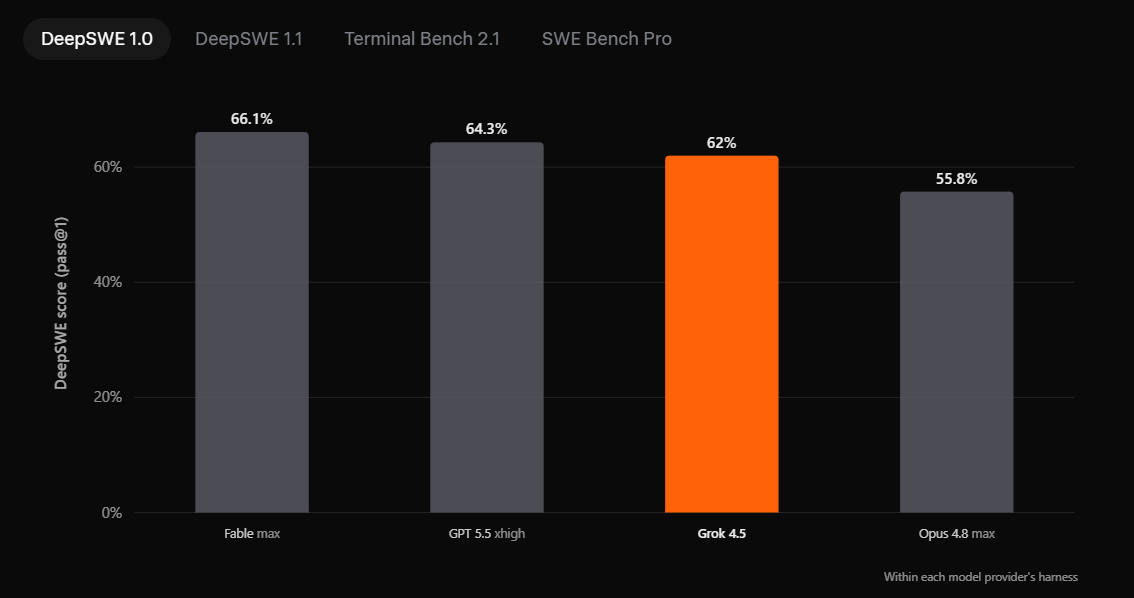
There are four major coding benchmarks where Grok 4.5 competes with GPT-5.5, Opus 4.8, and Fable. The scores are close across the board — Grok 4.5 lands at 62% on DeepSWE 1.0 and 83.3% on Terminal Bench 2.1, within striking distance of every leading model.

But the number that actually matters isn’t a percentage. It’s efficiency. On SWE Bench Pro, Grok 4.5 uses an average of 15,954 output tokens to resolve a task. Opus 4.8 uses 67,020 tokens for the same work. That’s 4.2× fewer tokens. In practice: Grok 4.5 gets the same result with less than a quarter of the output. Less rambling, more solving.

Built for Real Engineering

I’ve watched Grok 4.5 build a full solar system simulation with Three.js from a single prompt — adjustable time acceleration, orbital mechanics, modern HUD. The code was clean and production-ready.

If you work in Rust, C, or C++, the model handles those as naturally as Python. It was trained on datasets spanning coding, science, engineering, and math. The result isn’t just a model that writes code — it’s one that understands the engineering context around the code.

Faster Than Flash Models

Grok 4.5 serves at 80 tokens per second. Most reasoning models of this caliber run at 15–30 TPS. The difference is tangible: you paste a 500-line function, hit enter, and the refactor appears before your cursor stops blinking.

The pricing is equally aggressive: $2 per million input tokens, $6 per million output. Combined with 2× token efficiency over comparable models, the effective cost per task is dramatically lower. A typical SWE Bench Pro task costs about $0.10 on Grok 4.5 versus $0.40 on Opus 4.8.

It Does Spreadsheets and Presentations Too

Grok 4.5 isn’t a one-trick model. It scored #1 on Harvey’s Legal Agent Benchmark. In Grok Build, it can build complex Excel models with multi-sheet formulas and web research. It uses native PowerPoint shapes for diagrams and writes clear prose in Word. I watched it draft a five-slide quarterly business review from scratch — sections, layout, everything.

FAQ

How does Grok 4.5 stack up against GPT-5.5 and Opus 4.8?

It beats Opus 4.8 on every major coding benchmark and trades blows with GPT-5.5 — within 1–2 percentage points on most tests. The real advantage is efficiency: it uses 4.2× fewer tokens than Opus 4.8 for the same results.

Can I use Grok 4.5 in Cursor right now?

Yes — it’s available in Cursor on all plans today. Also in Grok Build and through the API. There’s free usage for a limited time, so no reason not to try it.

Is Grok 4.5 available in Europe?

Not yet. EU availability is expected in mid-July 2026. SpaceXAI confirmed no EU access through any of their products or the API until then.

How much does it actually cost?

$2 per million input tokens, $6 per million output tokens. With the 2× token efficiency, the real cost per task is roughly a quarter of what you’d pay on Opus 4.8.

What hardware was it trained on?

Tens of thousands of NVIDIA GB300 GPUs, with heavy investment in data filtering and deduplication. The RL training stack is designed for highly asynchronous operation — model rollouts can run for hours while training continues in parallel.

Try It on Something Real

Grok 4.5 is available right now at x.ai/cli. Grab an API key, pick an engineering task you’ve been avoiding — the Rust refactor, that SQL query that needs rewriting, the Python script that’s been running slow — and see how it handles it. There’s free usage through the end of July, so the only cost is five minutes of your time.

I found my Rust refactor in under a minute. I’m not switching back.


Wednesday, July 1, 2026

I Found an AI Model That Costs 1/3 on OpenCode GO


Photo by Mohammad Rahmani on Unsplash

I opened my OpenCode GO dashboard last Thursday and stared at the Minimax M3 row. The “3x” badge in the corner didn’t look special, but the math was: three times the output for the same dollar. I’ve been running it for a week alongside Claude, Gemini, DeepSeek, and Qwen — here’s what the deal actually looks like in practice.

What the 3x Usage Deal Actually Is

Minimax M3 is available on OpenCode GO with a 3x usage multiplier. For every dollar you spend against your credit pool, you get three dollars’ worth of M3 API calls. It’s a limited-time promotion, but while it’s active, it changes the calculus on which model makes sense for day-to-day coding.

The OpenCode GO plan costs $10 per month and gives you roughly $60 in API credits across its supported models. With the 3x boost on M3, that $60 effectively becomes $180 worth of M3 usage against the per-hour rate limit. For a developer running multiple agentic loops or frequent sub-agent calls, that’s not a small difference — it’s the difference between carefully rationing your calls and not thinking about cost at all.

The catch: there’s a usage cap per five-hour window. If you’re running constant agent sessions, you’ll hit that ceiling. For those moments, going direct to the API with permanent discounts like DeepSeek’s 75% offer may work better. But for the majority of development work — the daily flow of writing, debugging, testing, and reviewing — the GO plan plus M3 is hard to beat on pure value.

How OpenCode GO Pricing Shapes Your Choice

OpenCode GO isn’t a raw API subscription. You pay $10 and get a pool of credits that apply across models at different burn rates. Some models eat credits fast; others are more economical. The 3x boost on M3 makes it one of the most credit-efficient models on the platform.

This matters more than you’d think. When every sub-agent call, every orchestrator loop, and every tool-use request draws from the same pool, the credit multiplier on M3 means you can run more experiments in the same budget. I found myself trying approaches I would have skipped on other models — not because M3 is always better, but because the effective cost per attempt was low enough that the question wasn’t “is this worth the API call?” but “does this approach make sense?”

How M3 Compares to Qwen, DeepSeek, and Gemini

I ran Minimax M3 against Qwen 3.7 Max, DeepSeek V4 Pro, Gemini 3.5 Flash, and Claude Sonnet on a set of coding tasks over the past week. Here’s what stood out.

Better instruction-following than Qwen. Qwen 3.7 Max is smart but unpredictable. It often ignores parts of the spec, writes overly aggressive code, or adds features nobody asked for. M3 is more disciplined — it follows the prompt more closely and even asks clarifying questions before diving in. That alone saves a round-trip.

More consistent than DeepSeek V4 Pro. DeepSeek V4 Pro can match Claude Sonnet on a good day, but it hallucinates. It’ll “misunderstand” a detailed plan and produce something that looks right architecturally but doesn’t fit the spec. M3 is more conservative — it stays closer to what you asked for, which matters more for production code than raw creativity.

Comparable to Gemini 3.5 Flash in coding, better in reasoning. Several developers in the OpenCode community agree: M3 is on par with Gemini 3.5 Flash for code generation, but it handles multi-step agentic tasks more reliably. Gemini Flash tends to lose context in longer chains; M3 holds the thread better.

Still below Claude for complex tasks. For architecture decisions, multi-file refactors, and nuanced business logic, Claude Sonnet 4 or 5 remains ahead. But M3 closes the gap more than its price tag suggests. The gap is narrower than the cost difference would imply.

Why I Use M3 as My Daily Driver

I use Minimax M3 as my all-purpose model on OpenCode. For orchestrator tasks, sub-agent routing, and day-to-day coding, it handles everything competently. The fact that it costs a third of what I’d pay for other models of similar quality means I can run more experiments, iterate faster, and keep my monthly costs predictable.

The feature that surprised me most: M3 asks questions before it acts. When the spec is ambiguous, it pauses and asks for clarification rather than guessing wrong and producing broken output. That’s rare in this price bracket and makes it significantly safer for agentic workflows where a wrong turn costs minutes, not just tokens.

FAQ

Is Minimax M3 as good as Claude for coding?

For complex architecture and multi-file refactors, no — Claude Sonnet 4 or 5 is still clearly ahead. But for day-to-day coding, sub-agent tasks, and straightforward feature work, M3 is surprisingly close at a fraction of the cost.

How long will the 3x usage promotion last?

It’s a limited-time event, and OpenCode hasn’t announced an exact end date. Promotions like this typically run for weeks to months. Check the OpenCode GO pricing page for the current status.

Should I use OpenCode GO or the official Minimax API?

If you’re a casual to moderate user, OpenCode GO at $10 per month with roughly $60 in credits is the better value. If you’re a power user hitting the five-hour rate limits regularly, the direct API route may give you more flexibility. With the 3x boost, M3 on GO is especially attractive for the middle tier of usage.

What makes Minimax M3 different from Qwen and DeepSeek?

M3 is more careful. It follows instructions more closely, asks clarifying questions, and produces more predictable output. Qwen 3.7 Max is more powerful but erratic — it can produce brilliant results or go off the rails. DeepSeek V4 Pro is inconsistent — impressive one moment, hallucinating the next. M3 trades some peak performance for reliability, which is a worthwhile swap for production work.

Try It for a Week

The 3x usage deal on Minimax M3 is one of the best value propositions in AI coding right now. If you’re already on OpenCode GO, switch M3 on for a week and watch your effective cost per task drop. If you’re not on the plan yet, grab a $5 discount at the OpenCode GO page and see for yourself.

If Minimax M3 isn’t the right fit for your use case, you’ve lost nothing — the GO plan works across dozens of models. But if it does click, you’ve just cut your effective API cost by two-thirds. That’s a bet worth taking.

Tuesday, June 30, 2026

China Just Dropped 20M Free AI Tokens (And Nobody Noticed)


Photo by Mohammad Rahmani on Unsplash

If you’re a developer who pays $20/month for Cursor Pro, $10 for GitHub Copilot, or burns through API credits like candy — stop. A 756-billion-parameter coding model just landed with a 20-million-token free tier. No credit card. No subscription. And somehow, almost nobody in the Western developer community is talking about it.

What Zhipu AI’s GLM-5.2 Actually Gives You

GLM-5.2 is a massive 756B-parameter model from Zhipu AI, a Beijing-based AI lab often described as China’s closest equivalent to OpenAI. The headline offer is 20 million free API tokens for new developers — not a trial, not a “first month free” gimmick. Create an account and you get the full quota immediately, no billing info required.

Beyond the token grant, you also get 120 free image and video credits, access to GLM-5.2’s “High” and “Max Thinking” reasoning modes, and a 1-million-token context window. That’s large enough to feed an entire codebase into a single prompt and still have room for instructions.

The API is OpenAI-compatible. You can point Cursor, Claude Code, Cline, or any OpenAI SDK at it by swapping the base URL and model name. No custom integration, no new tools to learn. If your editor already speaks OpenAI, it already speaks GLM-5.2.

How It Stacks Up Against What You’re Already Paying For

Do the math on your current AI coding stack. Cursor Pro costs $20/month. GitHub Copilot is $10/month. Claude API charges per token. Add them up and you are looking at $30+ per month for tools that help you write code faster.

GLM-5.2 replaces all of them at zero cost for the first 20 million tokens. For a solo developer or small team experimenting with AI-assisted coding, the savings add up fast. Twenty million tokens goes a long way — hundreds of code completions, dozens of full-file refactors, and plenty of room for trial and error.

GLM-5.2 also supports a “Max Thinking” mode that applies chain-of-thought reasoning to complex coding tasks. In practice, this means better results on multi-step refactors, debugging sessions, and architectural decisions — exactly the places where smaller models fall apart.

Why the Silence?

If the offer is real and the model is competitive, why isn’t everyone talking about it? Three factors explain the gap.

Geographic attention bias. Chinese AI labs rarely receive the same Western media coverage as OpenAI, Anthropic, or Google DeepMind. A breakthrough from Beijing doesn’t trend on Hacker News the same way one from San Francisco does. This isn’t new — it’s been true since the earliest days of China’s AI industry.

Trust and data privacy. GLM-5.2 routes through Chinese infrastructure. For many Western developers and enterprises, that’s a dealbreaker. Data residency requirements, compliance policies, and geopolitical caution create a barrier that no amount of free tokens can overcome.

The U.S.-China AI perception gap. Some developers avoid Chinese models on principle; others assume they can’t be competitive. The assumption is increasingly outdated — several Chinese models now rank in the top tier of coding benchmarks — but the perception lingers. GLM-5.2’s 756B parameter count and benchmark scores are competitive with frontier Western models, but mindshare in the developer community hasn’t caught up.

How to Try It in Two Minutes

Here’s the fastest path to get coding with GLM-5.2:

  1. Register at open.bigmodel.cn
  2. 2. Verify your account with your phone number (OTP arrives in a few minutes)
  3. 3. Create an API key from the dashboard
  4. 4. Set your base URL to the GLM-5.2 endpoint
  5. 5. Select model: glm-5.2

For Cursor users: open Settings, go to Models, add a new model provider, and paste your GLM-5.2 API key and base URL. For OpenAI SDK users: set OPENAI_BASE_URL and OPENAI_API_KEY as environment variables. For Cline and similar tools: the model provider setup screen accepts any OpenAI-compatible endpoint — add GLM-5.2 as a custom provider and you’re done.

The Real Catch — Three Caveats Worth Knowing

A free offer at this scale comes with tradeoffs worth understanding up front.

Data residency. Zhipu AI’s API servers are in China. If your codebase contains sensitive or proprietary code that you can’t route through Chinese infrastructure, this isn’t for you. No free tier is worth a compliance violation.

Phone verification. Registration requires a phone number and OTP. Some non-Chinese users report delays receiving the verification code. If you’re outside China, budget a few extra minutes for this step.

Long-term uncertainty. Zhipu AI hasn’t published clear post-quota pricing. The 20M free tokens are framed as a developer acquisition play rather than a limited promotion, but any free API offering can change. If you build a workflow around it, keep a paid fallback ready.

FAQ

Can I use GLM-5.2 with Cursor or VS Code?

Yes. The API is fully OpenAI-compatible. Add it as a custom model provider in Cursor, Claude Code, Cline, Continue.dev, or any tool that supports OpenAI’s API format. Just swap the base URL and model name — no custom integration needed.

How does GLM-5.2 compare to GPT-4o or Claude 4 Sonnet?

GLM-5.2’s 756B parameters put it in the same weight class as the largest frontier models. On coding benchmarks, it scores competitively. The practical differentiators are the 1M-token context window and the zero-cost entry point. Most developers report it handles complex refactoring and debugging well in Max Thinking mode.

What data does Zhipu AI collect from API calls?

Zhipu AI’s data handling policies are less transparent than Western providers. Review the terms of service carefully before sending proprietary code. For open-source or personal projects this is less of a concern, but enterprise teams should involve legal before routing sensitive code through the API.

Is phone verification required for all users?

Yes, registration requires a phone number. Some users outside China report OTP delivery delays. If you don’t receive the code within a few minutes, try again after an hour — the system sometimes throttles international SMS.

Will the 20M free tokens refresh or is it a one-time grant?

The 20M tokens are a one-time welcome grant for new developers, not a recurring monthly quota. Zhipu AI hasn’t announced post-consumption pricing. Pace your usage accordingly: use it for evaluation and experimentation first, migration second.

Try It Before the Quota Changes

Twenty million tokens is enough to decide whether GLM-5.2 fits into your workflow. Sign up, point your editor at it, and spend an afternoon testing it on your actual codebase. If it works, you’ve just eliminated a monthly subscription. If it doesn’t, you’re out two minutes and zero dollars.

The offer is real. The model is competitive. The silence from the Western developer community won’t last forever — and when the conversation starts, you’ll already have an opinion.

Copilot Beats Claude Code on Cost and Matches It on Quality


GitHub benchmarked its agentic harness across 5 test suites and found that model-agnostic agents deliver the same results for fewer tokens. Here’s what that means for your next project.

If you’re a developer deciding between Copilot, Claude Code, and Codex CLI, you’ve probably seen plenty of claims but not much controlled data. Last week, GitHub published a head-to-head comparison of the Copilot agentic harness against the native harnesses that ship with leading models — holding the model and task fixed across five separate benchmarks.

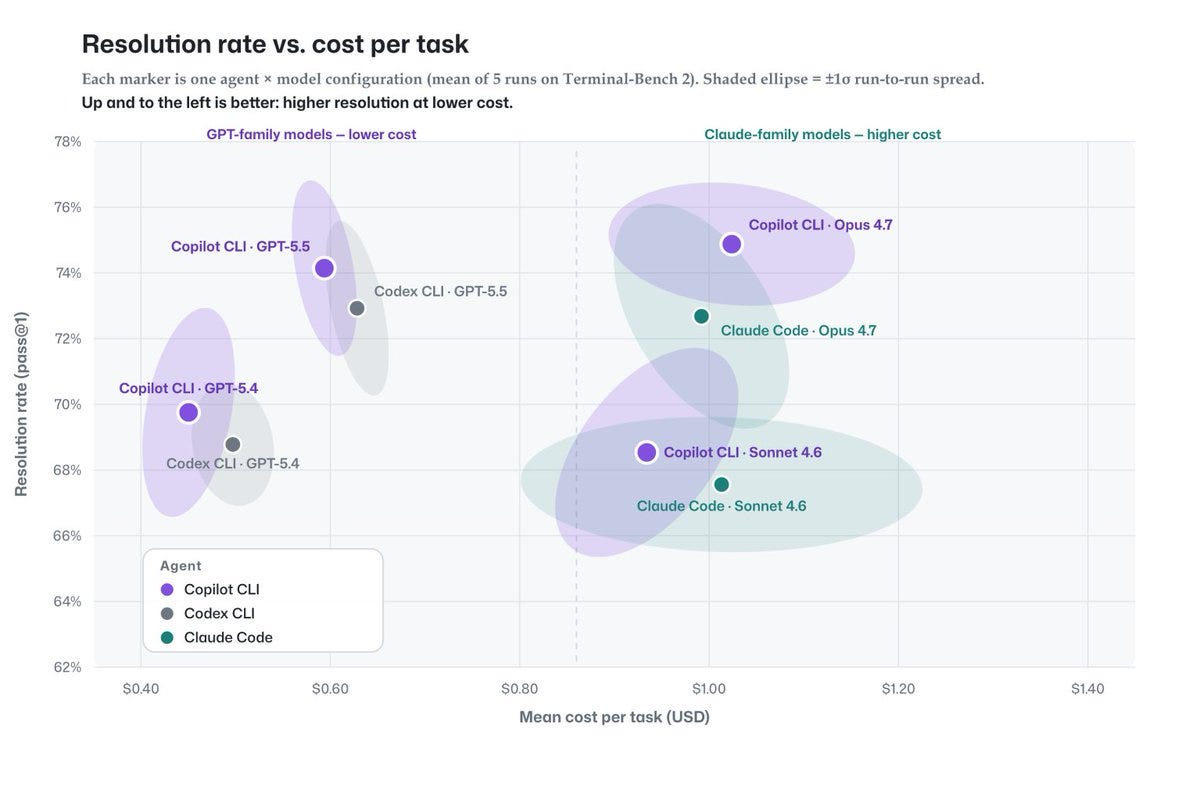
The results land on a scatter plot that’s hard to ignore. Copilot CLI clusters in the top-left corner: high task resolution at low cost. Claude Code and Codex CLI sit to the right, spending more per task for equivalent or worse resolution.

What GitHub Actually Tested

GitHub ran every harness-model combination across five benchmark suites: SWE-bench Verified, SWE-bench Pro, SkillsBench, TerminalBench, and Win-Hill. The methodology held the model constant and varied only the harness, isolating the harness as the variable rather than the model’s capability. On TerminalBench 2 alone, every configuration was run five times with a shaded ±1σ ellipse to capture variance.

This matters because most AI coding tool comparisons conflate model quality with harness quality. A great model inside a wasteful harness gives you expensive, slow results. A decent model inside an efficient harness might outperform it.

The Chart That Changes the Calculation

The scatter plot splits into two clear clusters. On the left, GPT-family models (GPT-5.4, GPT-5.5) run at $0.40–$0.60 per task with 65–70% resolution. On the right, Claude-family models (Sonnet 4.6, Opus 4.7) run at $0.80–$1.40 per task with 68–78% resolution. Copilot CLI holds the top-left position across both clusters — above-average resolution with below-average cost.

Why Token Efficiency Is the Real Story

The headline number isn’t resolution — it’s tokens. Across most configurations, the Copilot agentic harness used fewer tokens to reach the same result. Fewer tokens means faster feedback loops, lower latency during interactive use, and cheaper CI/CD integrations.

For a team running AI-assisted code reviews or automated patch generation, token count maps directly to cost per operation. A harness that wastes tokens on verbose planning traces adds up fast. At scale, the difference between $0.60 and $1.20 per task isn’t academic — it’s your monthly infrastructure bill.

Vendor-native harnesses are the worst offender. They’re optimized for one model’s output format and don’t adapt. The Copilot harness, by contrast, is model-agnostic — it speaks the same protocol to any underlying model and strips out overhead.

The 20-Model Advantage No One’s Talking About

Consider a concrete scenario. You’re iterating on a React component. Quick feedback matters, so you route the task to GPT-5.5 through Copilot — fast, cheap, good enough. Then you hit a tricky race condition in the state management. You route the same conversation to Claude Opus 4.7 — deeper reasoning, more tokens, higher cost, but the bug is complex. Once the fix is validated, you’re back to the fast model.

This is impossible with vendor-native harnesses. Codex CLI locks you into OpenAI’s model line. Claude Code’s harness locks you into Anthropic’s. The Copilot agentic harness supports more than 20 models and lets you switch per task without changing your workflow.

How to Choose Your AI Coding Agent Now

Prioritize model diversity. A team using a single model’s native harness is one API deprecation away from rebuilding their workflow. A model-agnostic harness insulates you.

Watch cost per task, not cost per token. A tool that uses 2x the tokens for the same result is expensive regardless of per-token pricing. The benchmark data gives you the real metric.

Test on your own workload. Run a side-by-side on your most common task — a PR review, a refactor — and measure both resolution and tokens.

The data doesn’t say Copilot is categorically better. It says a well-designed agentic harness beats a vendor-locked one, regardless of the model underneath.

FAQ

Does Copilot support models other than OpenAI?

Yes. The Copilot agentic harness works with more than 20 models from OpenAI, Anthropic, and others. You can switch between them per task without changing your editor or workflow.

How do the benchmarks translate to real-world use?

Benchmarks measure task-completion accuracy in controlled environments. Real-world results vary by codebase, but the relative efficiency advantage — fewer tokens for the same resolution — tends to carry over because it’s a harness property, not a model property.

Should I switch from Claude Code to Copilot based on this data?

Not necessarily. If Claude Code gives you results you’re happy with and cost isn’t a concern, there’s no urgent reason to switch. But if you’re comparing tools from scratch or feeling the cost of verbose agent traces, the data suggests a model-agnostic harness delivers better economics.

What is an agentic harness?

It’s the middleware between you and the model. It decides how to break a task into steps, what context to include, when to call tools, and how to format the response. A good harness minimizes wasted tokens while maximizing task completion.

Can I use Copilot’s harness with my own API keys?

Copilot is a paid GitHub subscription. You can’t bring your own model API keys, but the model choice within the harness — across 20+ models — is included in the subscription.

Pick a Task and Measure

Open GitHub’s chart and look at the scatter plot for yourself. Then pick one task from your daily work — something you’d normally ask an AI assistant for — and run it side by side in Copilot and your current tool. Measure time to resolution and tokens used. The benchmark is a useful signal, but your own workflow is the only test that matters.

Your AI Coding Subscription Is Draining Your Wallet


Photo by Luca Bravo on Unsplash

I opened my credit card statement last month and found four charges I didn’t remember approving — $347 total, all for AI coding subscriptions. I cancelled three of them that same afternoon.

For a while, “unlimited” AI coding plans felt like the obvious choice. Pay a flat fee, use the assistant as much as you want, never think about tokens or credits. But that model never made economic sense for the companies running it — advanced models are expensive to serve — and the pendulum has swung hard toward measured usage.

I actually prefer the new direction. Token-based and quota-based plans let you budget your consumption, work in bursts without penalty, and never wonder if the “unlimited” label is about to get throttled. The hard part is figuring out which plan actually delivers.

Here’s what I found after a month of testing five AI coding subscription plans against real development workflows.

The End of Unlimited (And Why You Should Be Happy)

The tipping point was inevitable. Running frontier coding models costs real compute, and the old “all you can eat” pricing was burning VC cash, not building sustainable products.

What emerged instead is a matrix of options: token-based plans where you buy a pool of tokens each month, credit-based plans that meter specific capabilities, and quota-based plans that refresh weekly or daily. Each model suits a different working style, but they all share one upside — you know what you’re paying for.

The plans I tested: MiniMax Token Plan, MiMo Token Plan, GLM Coding Plan, OpenAI Codex (included with ChatGPT), and Kimi Code. Each got at least a week of real coding time.

MiniMax Token Plan — $20 for More Tokens Than You’ll Use

MiniMax’s Token Plan is the easiest recommendation on this list. For $20 a month, you get access to MiniMax’s coding models through their web app and desktop app, plus integrations with Claude Code, Cursor, Cline, Kilo Code, Roo Code, Codex CLI, and OpenCode.

The token allowance is generous. For daily coding — debugging, refactoring, running agentic workflows — I never came close to exhausting it. If you want to start even smaller, prepaid credits begin at $5.

This is the plan I’d recommend to any developer who wants high usage at a low price, no games, no hidden throttles.

MiMo Token Plan — The Speed King Nobody’s Talking About

MiMo surprised me more than any other plan on this list. The responses are fast, it uses fewer reasoning tokens than comparable services, and the UI generation quality is genuinely good.

The plan runs on credits that refresh monthly. You use them across MiMo’s model lineup, including MiMo-V2.5-Pro, which supports up to a 1 million-token context window and is built for agentic coding and long-horizon software tasks. It integrates with tools like OpenCode, Cline, OpenClaw, Kilo Code, and Blackbox.

If you’re building custom AI workflows or testing multiple models in parallel, MiMo’s combination of speed and token efficiency makes it a strong second option. It’s not a full IDE subscription — it’s a model access plan — but for agentic coding, it punches above its price.

GLM Coding Plan — Worth It Only If You Need GLM Models

GLM’s Coding Plan from Z.ai has gone through changes recently, and the price has increased. The company is investing in better models like GLM-5.2 and deeper integrations with coding tools, and the subscription reflects that cost.

Here’s the honest take: if you specifically want GLM models for your coding workflow — they work with Claude Code, Cline, Kilo Code, OpenCode, and OpenClaw — the plan delivers. The models are strong for focused coding agent sessions.

But if you’re just looking for the best generic coding subscription, cheaper options exist. GLM made more sense before the price increase. Today, use it when you need GLM-5.2 specifically.

OpenAI Codex — Free (If You Already Pay for ChatGPT)

OpenAI Codex lives inside the VS Code extension, and it’s the plan I use most days — not because it’s the best, but because it’s included with my ChatGPT subscription.

Codex understands your codebase well, handles code generation, debugging, project edits, and large-codebase navigation. The catch is the daily and weekly limits. In a serious coding session, those limits can disappear within an hour. OpenAI lets you buy extra credits as a cushion, but that adds to the cost.

The math is simple: if you already pay for ChatGPT, use Codex as your daily driver. When you hit the limit, switch to MiniMax or MiMo as a backup. No need for a separate primary subscription.

Kimi Code — Predictable Quota, No Monthly Burnout

Kimi Code uses a weekly refreshed quota instead of a monthly token pool. You get a set amount of usage every week, and it resets — no rollover, no guessing.

The Kimi K2.7 Code model handles codebase understanding, terminal tasks, file edits, debugging, refactoring, and feature building. You can access it through the web app, VS Code extension, and CLI.

The weekly refresh is an interesting tradeoff. If you code consistently every week, it works well. If you have heavy weeks and light weeks, a monthly token pool gives you more flexibility. Kimi Code is a solid choice if you’re already in the Kimi ecosystem or prefer K2.7 over other models.

FAQ

Can I use multiple AI coding subscriptions at once?

Yes, and most developers I know do exactly this. A common setup: OpenAI Codex as the daily driver (included with ChatGPT), with MiniMax or MiMo as a backup for heavy coding sessions when Codex limits run out.

Which AI coding plan is best for someone new to AI coding?

Start with OpenAI Codex if you already subscribe to ChatGPT. If you don’t, the MiniMax Token Plan at $20 a month is the lowest-risk entry point with the broadest tool support.

Do token-based credit plans expire?

It depends on the plan. MiniMax offers prepaid credits starting at $5 that you use when needed. Monthly token subscriptions reset each billing cycle. Kimi Code’s quota refreshes every week and does not roll over. Always check the plan’s expiration policy before buying.

How do I know which plan fits my workflow?

Match the pricing model to your work pattern: monthly token plans for bursty usage (heavy sprints, then lighter weeks), weekly quotas for consistent daily coding, and included subscriptions (Codex with ChatGPT) for the baseline you already pay for.

Here’s the quick-reference comparison:

  • MiniMax Token Plan: $20/month token pool — Best value on the list
  • - MiMo Token Plan: Monthly credits — Fast and token-efficient
  • - GLM Coding Plan: Quota-based subscription — Only if you need GLM
  • - OpenAI Codex: Included with ChatGPT — Free if you’re already paying
  • - Kimi Code: Weekly refreshed quota — Solid but niche

Open your billing page right now. If you’re paying more than $50 a month for any single AI coding subscription on this list, try swapping for a month. Start with Codex if you already have ChatGPT — it’s already on your bill. Add MiniMax or MiMo as a $20 backup. I saved $160 my first month, and my output didn’t drop.