Showing posts with label local-llm. Show all posts

Thursday, June 25, 2026

Local-First AI: 1-Bit GLM-5.2 vs Claude Opus and GPT-5.5

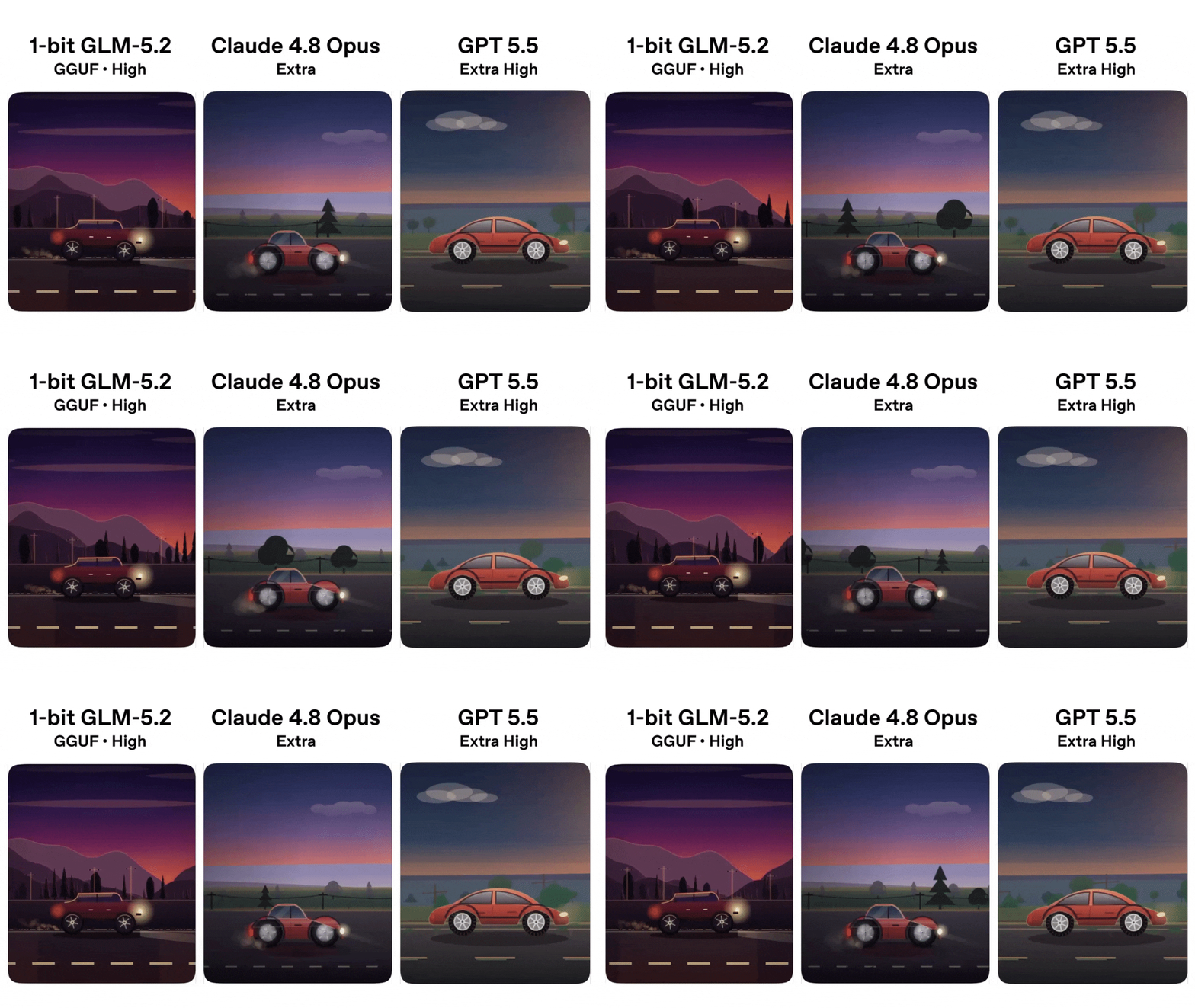
A 1-bit GLM-5.2 GGUF ran on a 256GB Mac Studio M3 Ultra and held its own against GPT-5.5 and Claude Opus 4.8.

Three models, one workstation, no API calls — and the smallest of them kept up.

If you build with LLMs, the implication is worth sitting with. Local-first AI no longer means “good enough for chat, weak at real work.” The 1-bit GGUF is not a stunt demo. It is a working checkpoint you can pull today and serve from your own machine.

The test that made people pay attention

Daniel Hanchen from Unsloth posted the same prompt to GLM-5.2, Claude Opus 4.8, and GPT-5.5. The prompt itself was deliberately hard: build a technically impressive Backrooms horror game in a single self-contained HTML file, with a raycaster, procedural textures, infinite chunks, dynamic lighting, Web Audio, and a long list of psychological-horror behaviors. Not the kind of thing a one-shot would normally nail.

The point of the exercise, in Hanchen’s own framing, was not to crown a winner. The point was to show that 1-bit can actually perform well. The 1-bit GLM-5.2 GGUF ran at roughly 21.6 tokens per second on the Mac Studio, fast enough that one-shot felt like a normal chat session, not a wait. A side-by-side showcase video came out of the test too — generated, notably, by the Q4 model itself, running inside the Pi Coding Agent, with Puppeteer capturing frames, labels, and ffmpeg encoding the result end to end. The test produced its own documentary.

Why 1-bit is suddenly viable

A 1-bit model sounds like a contradiction. If each weight is one bit, the model is basically a lookup table. In practice, modern 1-bit and sub-1-bit quantization (Unsloth’s dynamic GGUF variants, QuIP# and related techniques) pack two weights per bit and rely on lookup-table decoders that fit neatly on Apple Silicon and modern GPUs. The math is real, and the calibration data matters a lot.

The other half of the story is hardware. Apple Silicon’s unified memory lets a 256GB Mac Studio hold a model that would otherwise need a server with multiple GPUs. When the model lives in unified memory and the quant is small enough, the bottleneck is no longer VRAM, it is memory bandwidth — and that is where M3 Ultra is genuinely fast.

So the 1-bit result is not a free lunch. It is the intersection of a specific quantization recipe, a specific architecture, and a specific workstation. But that intersection is now reachable for an individual developer, not just a research lab.

Where extreme quantization still breaks

A commenter in the same thread ran UD-Q2_K_XL against UD-Q4_K_M on the same game-dev prompt. Q2’s token usage was substantially higher than Q4’s, and on that particular test the Q2 output was slower and visibly broken. Smaller quant does not always mean “smaller and better.” Below a certain point, the model starts rambling, losing structure, or duplicating tokens to compensate for the lost precision.

This is the local-first tradeoff in one screenshot: every halving of the bit width is a coin flip. Q4 and Q5 are usually safe for instruction following. Q3 is where you start watching carefully. Q2 is research-grade — sometimes it surprises you, often it does not. The 1-bit result above is impressive, but it is also the best case the team chose to publish. Treat the lower bounds with the same respect you would give a benchmark from a paper that did not show variance.

What this means for the cost of inference

If a $5,000 Mac Studio can run a 1-bit GLM-5.2 at 21 tok/s and hold its own against two of the most expensive closed models on the planet, the per-token economics of “good enough” work just changed. You do not need to call an API for every refactor, every docstring, every test scaffold. You can run a long context on your own desk, pay nothing per token, and keep the data on the device.

That does not put OpenAI or Anthropic out of business. The frontier keeps moving, and the hardest tasks still benefit from the biggest models. But the floor — the layer of work that used to be “too expensive to use an API for but too important to skip” — is now a local inference problem. For a lot of teams, that is a bigger shift than the next flagship model.

FAQ

What is 1-bit LLM quantization?

1-bit quantization stores each weight using roughly one bit, usually by pairing two weights per bit and decoding them with a lookup table at runtime. Modern 1-bit GGUFs (Unsloth’s UD-Q2_K_XL, QuIP#-style variants) use calibration data to choose which weights to pack together, which is why the resulting model can still follow long instructions.

Can a 1-bit model really match GPT-5.5 and Claude Opus?

In Unsloth’s side-by-side, yes — on the one-shot prompt the team chose, the 1-bit GLM-5.2 was judged comparable to both frontier models. That is one test on one prompt, not a general claim. For most coding and writing tasks, expect a real quality gap; for short, well-scoped tasks, the gap can be small.

What hardware do I need to run 1-bit GLM-5.2 locally?

Unsloth’s 1-bit GGUF ran at about 21.6 tok/s on a Mac Studio M3 Ultra with 256GB of unified memory. Lighter quants like UD-Q4_K_M run on a wide range of Apple Silicon Macs and on most modern CUDA GPUs — the Unsloth docs list the exact memory requirement for each variant. The llama.cpp install is one curl line; Ollama, LM Studio, and Unsloth Studio all wrap the same backend.

How does 1-bit compare to 4-bit or 8-bit quantization?

4-bit and 5-bit GGUFs are the practical sweet spot for most production use: small enough to fit on consumer hardware, accurate enough to trust. 8-bit is closer to lossless and rarely worth the size. 1-bit and 2-bit are extreme: blazingly fast and small, but the failure mode is silent — the model runs fine, it just hallucinates more.

Is 1-bit the future of local AI?

I would not bet on 1-bit as the steady state — Q4 and Q5 will keep doing most of the work for a while. But the fact that 1-bit is now a credible option on a single workstation tells you where the curve is going. Every six months, the smallest quant that “actually works” gets smaller.

Try it on your machine tonight

Pull the 1-bit GLM-5.2 GGUF, serve it with llama.cpp or Unsloth Studio, and run the same Backrooms prompt yourself. Twenty minutes of setup, zero API spend, and you will have a first-hand answer to the only question that matters: does it actually work for you?


7 Local Coding LLMs Worth Running on Your GPU (2026)

From Qwen3.6 to North Mini Code — practical picks, real benchmarks, and what to actually run on a 16–24 GB GPU.

If you’ve been paying $20 a month for Copilot and another $20 for Claude Code, and you’ve never actually run a coding model on your own machine, 2026 is the year to fix that. Local coding LLMs have crossed the line where they’re fast enough to feel useful, smart enough to solve real problems, and cheap enough that the only real cost is a GPU you might already own. I went through seven of the strongest open models you can run on a single consumer GPU right now, and the picture is clearer than the marketing would have you believe.

Why local coding LLMs matter in 2026

Three things changed at once. First, the open models got genuinely good — the Qwen, Gemma, and Cohere teams shipped coding-focused releases this year that benchmark close to hosted frontier models on LiveCodeBench and Codeforces. Second, GGUF quantization and llama.cpp matured to the point where a 27B model fits comfortably on a 16–24 GB GPU in 4-bit, and a 30B MoE with 3B active parameters fits on the same card with room to spare. Third, the price gap with hosted models is now obscene. A Claude Code subscription runs about $240 a year; an RTX 3090 is a one-time $600 purchase, and the model weights are free.

The other thing nobody talks about enough is privacy. When you run a coding model locally, your source code, prompts, and any private context never leave your machine. For anyone working under an NDA, in healthcare, finance, or defense, that is the actual reason to go local — not cost, not speed, but the simple fact that you can ship a model behind your firewall and audit it.

Four heavy hitters

Qwen3.6 27B MTP is the one I’d start with. It is a 27B model with a hybrid Gated DeltaNet and Gated Attention architecture, 262K context natively (extendable to 1M with YaRN), and Multi-Token Prediction that Unsloth says runs 1.5–2x faster than standard inference. The 4-bit Q4_K_XL GGUF is 17.9 GB, which fits on a 24 GB card like an RTX 3090 or 4090 with the KV cache intact. It is also multimodal — it can read screenshots and UI bugs, not just code. This is the closest thing to a default “just run this” model on the list.

Gemma 4 31B IT QAT is the multimodal workhorse. Google’s 31B dense model with Quantization-Aware Training hits 80.0% on LiveCodeBench v6 and a 2150 Codeforces ELO. It is also multimodal — text and image — but no audio on the 31B size. The 4-bit Q4_0 GGUF is 17.7 GB. If your work involves screenshots, UI bugs, diagrams, or documentation images, this is the model that does code and vision in the same response.

DiffusionGemma 26B A4B is the experimental speed play. It uses a block-diffusion architecture — 15–20 tokens per forward pass — instead of standard autoregressive decoding. Google claims 1100 tokens/sec on an H100 in FP8; on a single consumer GPU you’ll see a substantial speedup, though you pay for it: LiveCodeBench v6 drops to 69.1% (versus 77.1% for the standard Gemma 4 26B A4B). If you generate code by the screen-full and your bottleneck is throughput, this is the one to try. Note that it needs a custom llama.cpp build from PR #24423 — not a stock release.

Nemotron Cascade 2 30B A3B is for reasoning-heavy workflows. NVIDIA’s hybrid MoE — 30B total but only 3B active per token — behaves more like a reasoning agent than a coding autocomplete. The Q4_K_M GGUF is 24.7 GB, so it wants at least a 32 GB card to leave room for KV cache. NVIDIA claims gold-medal performance on IMO 2025 and IOI 2025. If you find yourself writing multi-step refactors, planning migrations, or debugging distributed systems, this model spends more time thinking than talking.

Three more worth knowing for specific workflows

Qwen3.5 9B MTP is for when your GPU is small. The 4-bit GGUF fits in roughly 6 GB of VRAM, so even an RTX 3060 or a 16 GB Mac can run it. It will not beat the bigger models on hard reasoning, but for daily coding, debugging, shell commands, and explanations, it is more than enough — and it is the safest starting point if you have never run a local coding model before.

EXAONE 4.5 33B is the document and Korean-language pick. LG AI Research’s 33B multimodal model is one of the strongest on document understanding, OCR, and Korean-language workflows. It hits 81.4% on LiveCodeBench v6 in reasoning mode. The 4-bit Q4_K_M GGUF is 20 GB. Two caveats: it is licensed under EXAONE 1.2-NC, which means it is free for personal and research use but not for commercial products, and the vision-language capability is what makes it different from the Qwen3.6 27B MTP — pick this one if your code work involves reading screenshots, PDFs, or Korean-language documentation.

North Mini Code 1.0 is the most coding-focused model on the list. Cohere’s 30B-A3B MoE was post-trained specifically for code generation, agentic software engineering, and terminal workflows. Three billion active parameters, 256K context, native function-calling support, and interleaved thinking. The UD-Q4_K_M GGUF is 19.2 GB. If you want a local coding agent that lives in your terminal and runs as the backend to OpenCode, this is the one — it was built for that use case, not as a general chatbot that happens to write code.

Pick the right local coding LLM for your hardware

Here is the decision table I would actually use, distilled from running these on different setups.

  • Qwen3.6 27B MTP — 17.9 GB in Q4, 24 GB GPU, all-round local coding, agentic workflows, multimodal.
  • - Gemma 4 31B IT QAT — 17.7 GB in Q4, 24 GB GPU, code plus screenshots, UI, diagrams, vision tasks.
  • - DiffusionGemma 26B A4B — 16.8 GB in Q4, 24 GB GPU, fast local generation, experimental, throughput.
  • - Nemotron Cascade 2 30B A3B — 24.7 GB in Q4, 32 GB GPU, reasoning-heavy, planning, multi-step refactors.
  • - Qwen3.5 9B MTP — ~6 GB in Q4, 8–12 GB GPU, small setups, daily coding, first local model.
  • - EXAONE 4.5 33B — 20 GB in Q4, 24 GB GPU, documents, PDFs, Korean-language, OCR (non-commercial).
  • - North Mini Code 1.0–19.2 GB in Q4, 24 GB GPU, terminal coding agents, repo edits, code review.

Frequently asked questions

What GPU do I actually need to run these local coding LLMs?

A 16 GB card (RTX 3060, 4060 Ti, 4070, 3090, 4080) is the entry point — the 9B and 26B-A4B models fit in 4-bit. A 24 GB card (RTX 3090, 4090, 5090) is the sweet spot, where you can run any of the heavy hitters in 4-bit with KV cache headroom. A 32 GB+ card is what you want for Nemotron Cascade 2 in higher quantizations or for long-context workloads above 128K tokens.

Can a local coding model actually replace Copilot or Claude Code?

For autocomplete, one-off scripts, debugging help, and code explanation, yes — in 2026 the gap is narrow enough that you will be happy. For very long agentic tasks, multi-step refactors, and complex planning, hosted frontier models still have an edge. The honest answer is to use both: local for the 80% of work that does not need a frontier model, hosted for the 20% that does.

Are these models really private if I download them from Hugging Face?

The weights themselves are not the privacy risk — the privacy risk is where inference happens. If you download a GGUF and run it with llama.cpp, Ollama, LM Studio, or vLLM on your own hardware, the model never phones home and your prompts never leave the machine. The exception is when you use a hosted inference provider (which routes your prompts to a remote GPU); that is not local, regardless of where the weights came from.

Do I have to use llama.cpp, or is there a simpler way?

For most people, LM Studio is the easiest entry point — it is a desktop app, you point it at a GGUF, and it runs an OpenAI-compatible local server in two clicks. Ollama is a good second choice if you want a CLI. llama.cpp, vLLM, and SGLang are what you reach for when you care about maximum throughput or specific inference features like Multi-Token Prediction on Qwen3.6.

How much does it cost in electricity to run one all day?

A 30B-A3B model at 4-bit on a 24 GB GPU draws roughly 250–350 W under sustained load. At a US average electricity rate of $0.16/kWh, that is about $0.04–$0.06 per hour, or roughly $1 a day if you run it eight hours. A month of hosted Claude Code runs $20, so the break-even on your electricity bill is essentially immediate.

If I had to pick one model to start with on a 24 GB GPU in 2026, it is the Qwen3.6 27B MTP in 4-bit. It is the most balanced of the seven — strong coding, multimodal, fast on real consumer hardware, and the most active community for support. Download the Q4_K_XL GGUF, point LM Studio at it, and you have a private coding model running in under fifteen minutes.

Press enter or click to view image in full size
A close-up photograph of a GPU graphics card with metallic heat sinks and circuit board traces, representing the hardware used to run coding language models locally on consumer hardware
Photo by Đào Hiếu on Unsplash